Inventory management · Windows POS
Know your stock.
Keep the counter ready.
Kassivo connects the product catalog, checkout and stock visibility in a local-first Windows workspace. Evaluate it with your own products, variants and everyday stock movements before choosing a license.
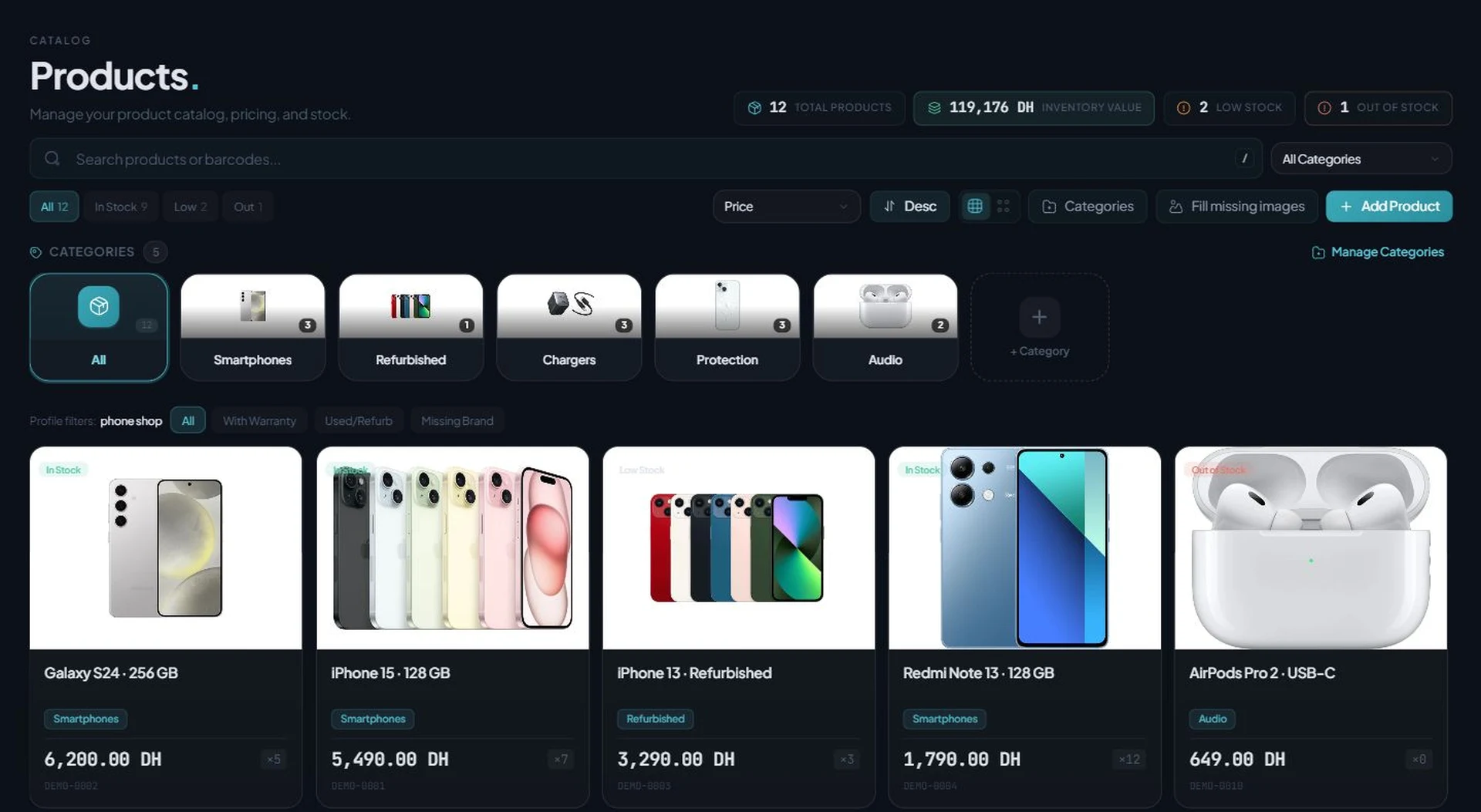
Current Products & Stock screen · manufacturer photos · fictional prices and quantities.
Inventory starts with a reliable product record
Inventory management software helps a shop identify products, record quantities and see when stock needs attention. A POS-connected catalog also gives the counter the product information used during a sale. Reliable setup matters as much as a long feature list.
Kassivo includes product records, barcodes, categories, pricing and stock views. The selected operating profile determines which specialist workflows are available. A clothing shop needs size and color variants; an electronics counter also needs to distinguish a product model from an individual device identity.
What to verify
Use a small, representative catalog during the trial. Include a fast seller, a low-stock item, an unavailable item and a product with variants.
- Find an item by its name and barcode; check the category and price.
- Check stock at the product and variant level rather than treating every size or color as interchangeable.
- Review low-stock and out-of-stock views with thresholds that make sense for your shop.
- Compare selling price, recorded cost and realized profit without confusing stock value with money already earned.
How the work should move
Follow one physical item from its record to a completed counter scenario.
- Create or review the product, barcode, unit, price, cost and starting quantity.
- Check any variants and the stock available for the exact item you will sell.
- Run a sample checkout, then inspect the sale and the resulting stock quantity.
- Test a cancellation before payment and a return after a completed sale. Check the records and quantities in each case.
- Review stock alerts and the dashboard, then reopen the app to confirm the saved state.
A five-item inventory trial
Prepare five items with known starting quantities. Record your expected result for one sale, one canceled checkout, one return and one stock change. Compare the product list, sale history and dashboard after each action.
Repeat the review with the staff role that will operate the counter. Confirm who may change prices, edit stock or view costs. A successful admin demonstration alone does not establish the right permissions for your team.
Before you decide
Local-first does not remove the need for backups
Keep a backup routine for the Windows computer that holds your business records. A local database and an offline counter do not replace recovery planning.
Check your selected profile, permissions and license scope before paying. A barcode scanner sends codes; a terminal connects to the Windows host. Neither should be assumed to provide an independent copy of the host inventory when disconnected.
Kassivo at a glance
- Product
- Local-first Windows point-of-sale software with profile-specific business workflows.
- Data and connectivity
- The Windows core uses local SQLite data. Terminals need the local network; external services need their required connection.
- License
- $200 launch price; $399 regular price. One selected operating profile, paid once.
- Trial
- A free 30-day trial is offered before purchase—no payment and no card required. Request a hardware-matched key; downloading does not start it automatically.
- Support
- Six months included. Continued support is optional. Cloud is planned and will be optional; the local license remains permanent.
- Operator
- Operated by Kassivo Team, Casablanca, Morocco. contact@kassivo.com · +212 629 693 932
Try Kassivo free for 30 days—no payment and no card required. After purchase, change-of-mind refunds are not available; if an unresolvable technical fault within 14 days cannot be fixed by support, you are eligible for a full refund. Refund Policy · License and purchase terms
Questions buyers ask
Can I manage product variants?
Kassivo supports product variants and variant stock. Test the combinations your shop sells and verify the exact stock shown during checkout.
Does a stock alert mean an automatic supplier order?
A low-stock alert identifies an item that needs attention. Do not assume it creates or sends a supplier order; verify your purchasing workflow separately.
Does this catalog contain real customer records?
No. The images on this guide use local sample records. Product photos come from manufacturer sources; prices and quantities are fictional.
Can the screenshots prove compatibility with my stock process?
No. They show the interface with sample data. Use the trial to verify your units, variants, permissions, stock movements and hardware before purchase.
Can I try Kassivo before buying? Are licenses refundable?
Try Kassivo free for 30 days—no payment and no card required. After purchase, change-of-mind refunds are not available; if an unresolvable technical fault within 14 days cannot be fixed by support, you are eligible for a full refund.
Test the real workflow, not a feature checklist.
Install Kassivo on Windows, request a 30-day key, and run the counter scenarios that matter to your business.