IPHONE 13 · SCREEN REPAIR
POINT OF SALE (POS) + OPERATIONS · WINDOWS · LOCAL-FIRSTV2.0.0
Point of sale isonly the beginning.
Kassivo combines a Windows point-of-sale core with Android terminal and barcode-scanner companions, plus a kitchen display over your local network. Manage sales, stock and team workflows with a permanent core license and no required monthly subscription.
BUILT IN RUST + TAURI12 OPERATING PROFILESLOCAL SQLITE COREONE-TIME CORE LICENSE
TRANSACTION SETTLEDThe rest is already moving. PROFILE-AWARE WORKFLOW
12 OPERATING PROFILESWINDOWS 10 / 11LOCAL SQLITE COREONE-TIME CORE LICENSE
01 YOUR INDUSTRY IS NOT A SKIN
Kassivo changes
underneath.
Twelve profiles reshape what the team sees and how work moves. Choose the world closest to yours.
01 ONE EVENT02 ONE ENGINE03 EVERY CONSEQUENCESALE — 18:42
KASSIVO CORESAME ENGINE · 12 PROFILESCORE UNCHANGED
- IDENTITYSERIAL LINKED
- INVENTORYPART −1
- WARRANTY90 DAYS ATTACHED
- CUSTOMERHISTORY +1 REPAIR
- ACCOUNTING+490.00 POSTED
PHONE & ELECTRONICS
A device has a life after the barcode.
Identity, intake, service, financing and delivery belong to one accountable history—not a trail of disconnected notes.
02 THE TRANSACTION IS A TRIGGER
One moment.Many consequences.
Depending on the active profile, a completed sale can carry useful context into the rest of the business.
SALE
COMPLETE The visible moment
COMPLETE The visible moment
The position changes.
Movement keeps its operational context.
The history becomes useful.
Relationship context can follow the sale.
The next station knows.
Kitchen or service work can move forward.
The drawer remembers.
Daily control stays connected to the event.
The signal surfaces.
Activity becomes a clearer operating picture.
THE EXACT CHAIN CHANGES WITH YOUR PROFILE, PERMISSIONS AND CONNECTED WORKFLOW.
03 / NO CONCEPT RENDERS
See pressure before it becomes a problem.
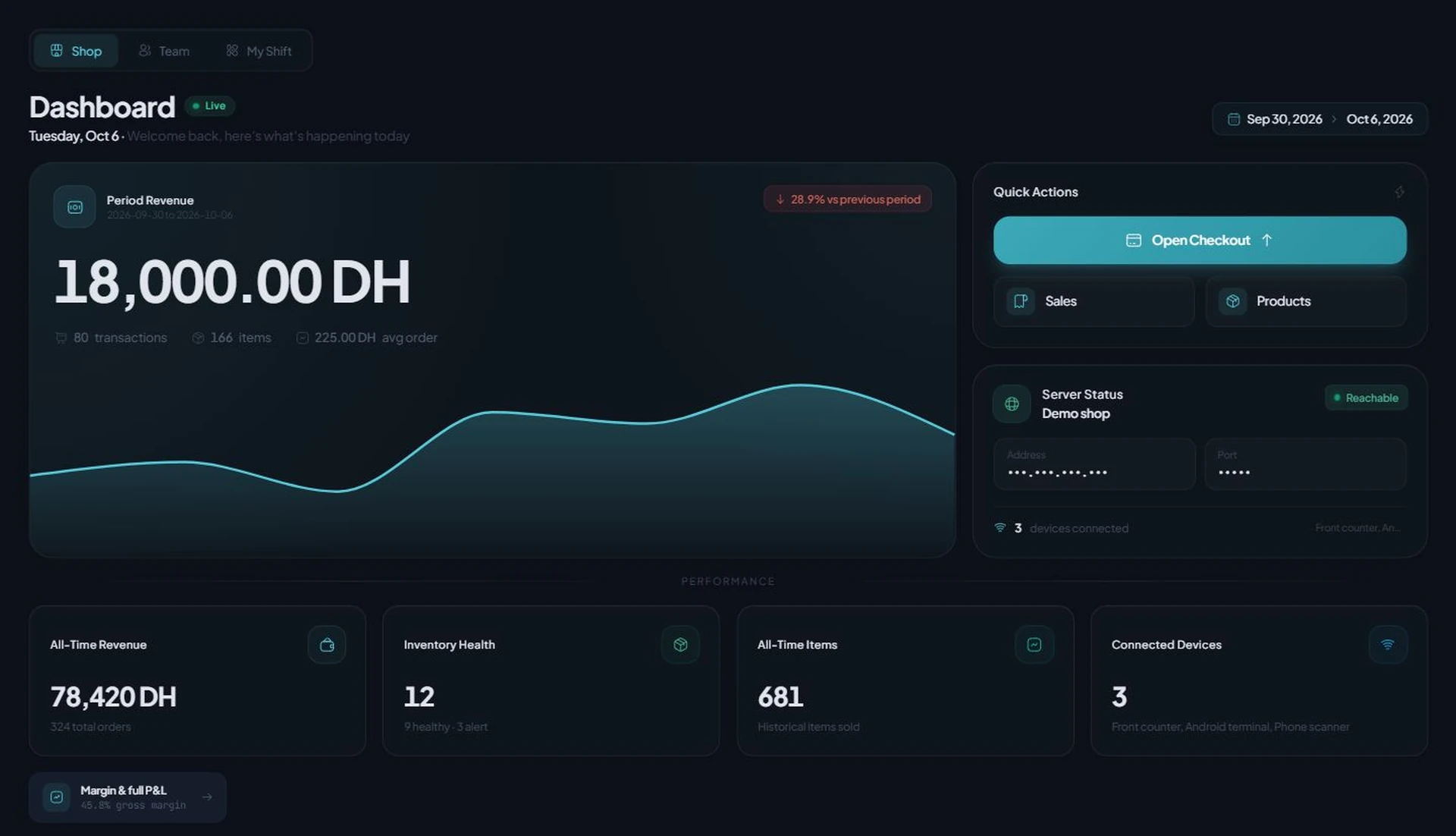
Sales movement, operating signals and the context behind them meet in one calm view. Current Windows dashboard · sample records · network details masked.
Fast in the moment. Complete after it.
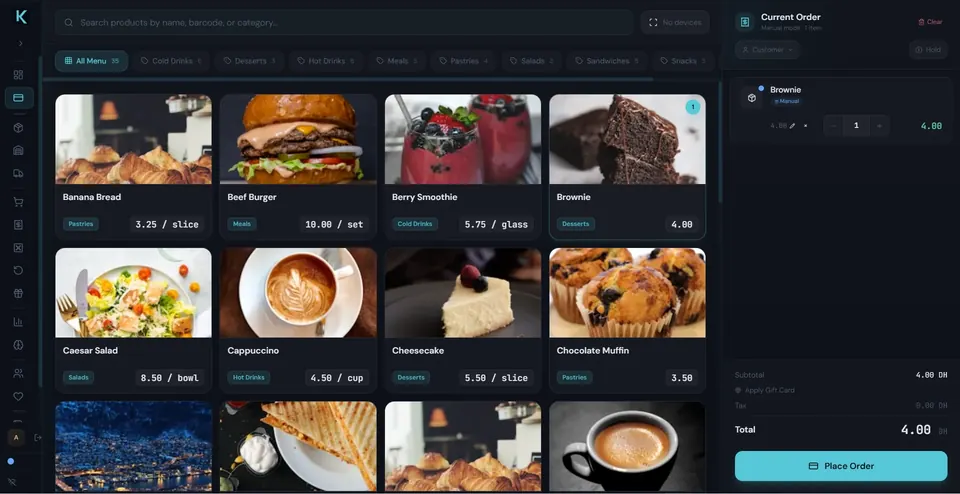
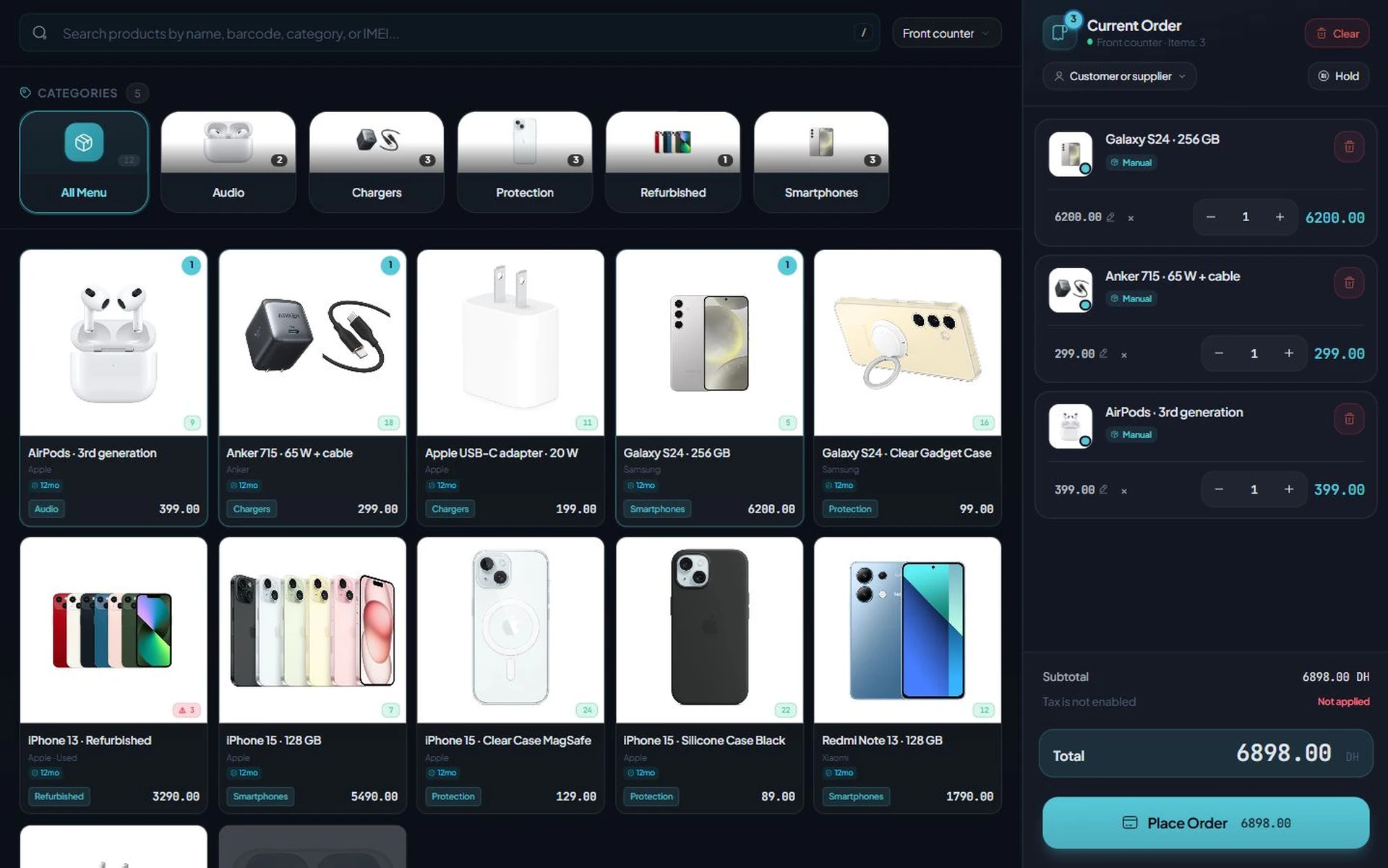
The counter stays focused while the transaction remains useful to everything that follows. Current checkout screen · fictional sample order · manufacturer product photos.
Stock is a moving story.
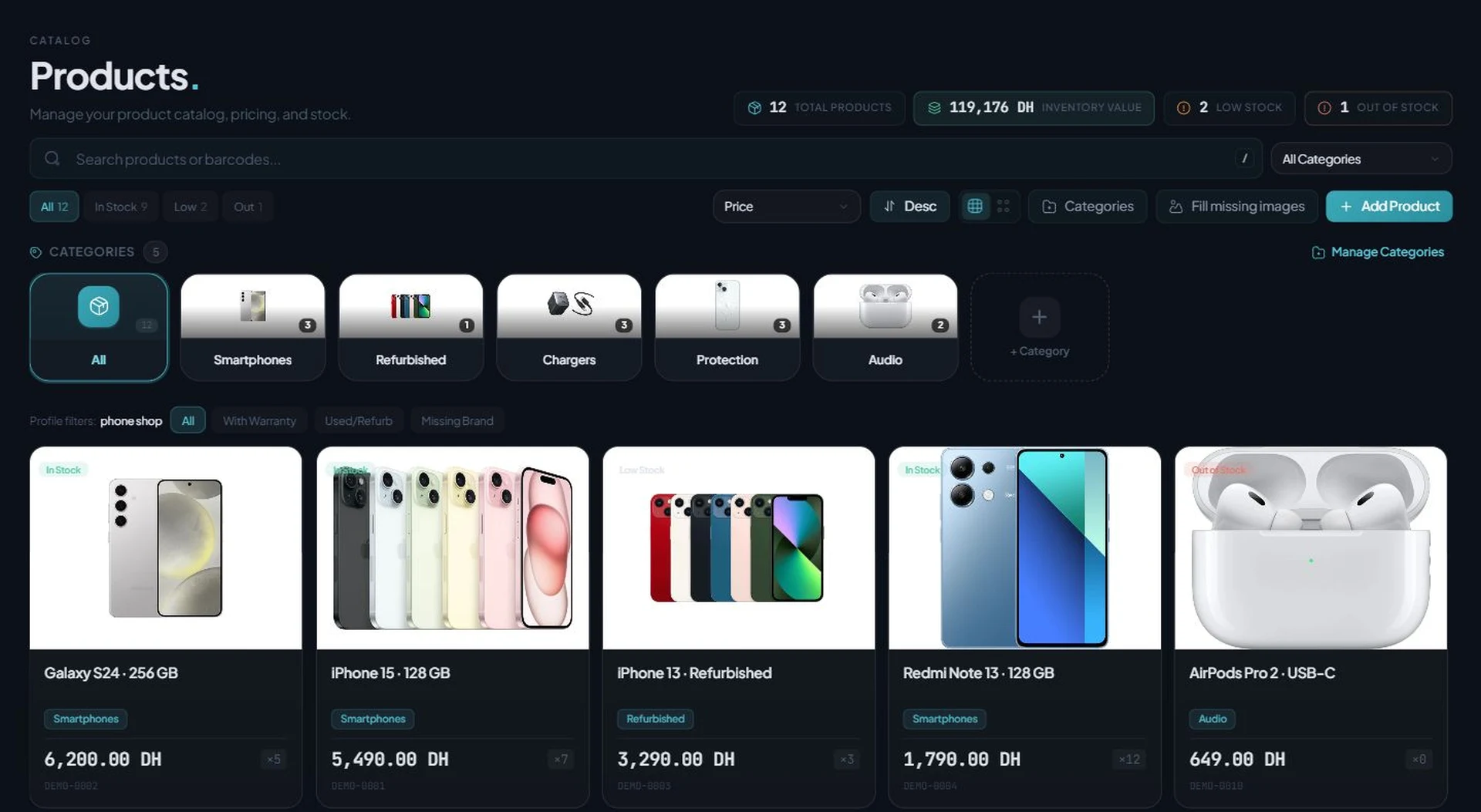
Purchasing, counts, suppliers and movement stay close enough to explain what changed. Current Products & Stock screen · manufacturer photos · fictional prices and quantities.
Know what deserves your attention.
Turn operating activity into a decision without rebuilding yesterday in a spreadsheet. Current Analytics page · fictional sample figures.
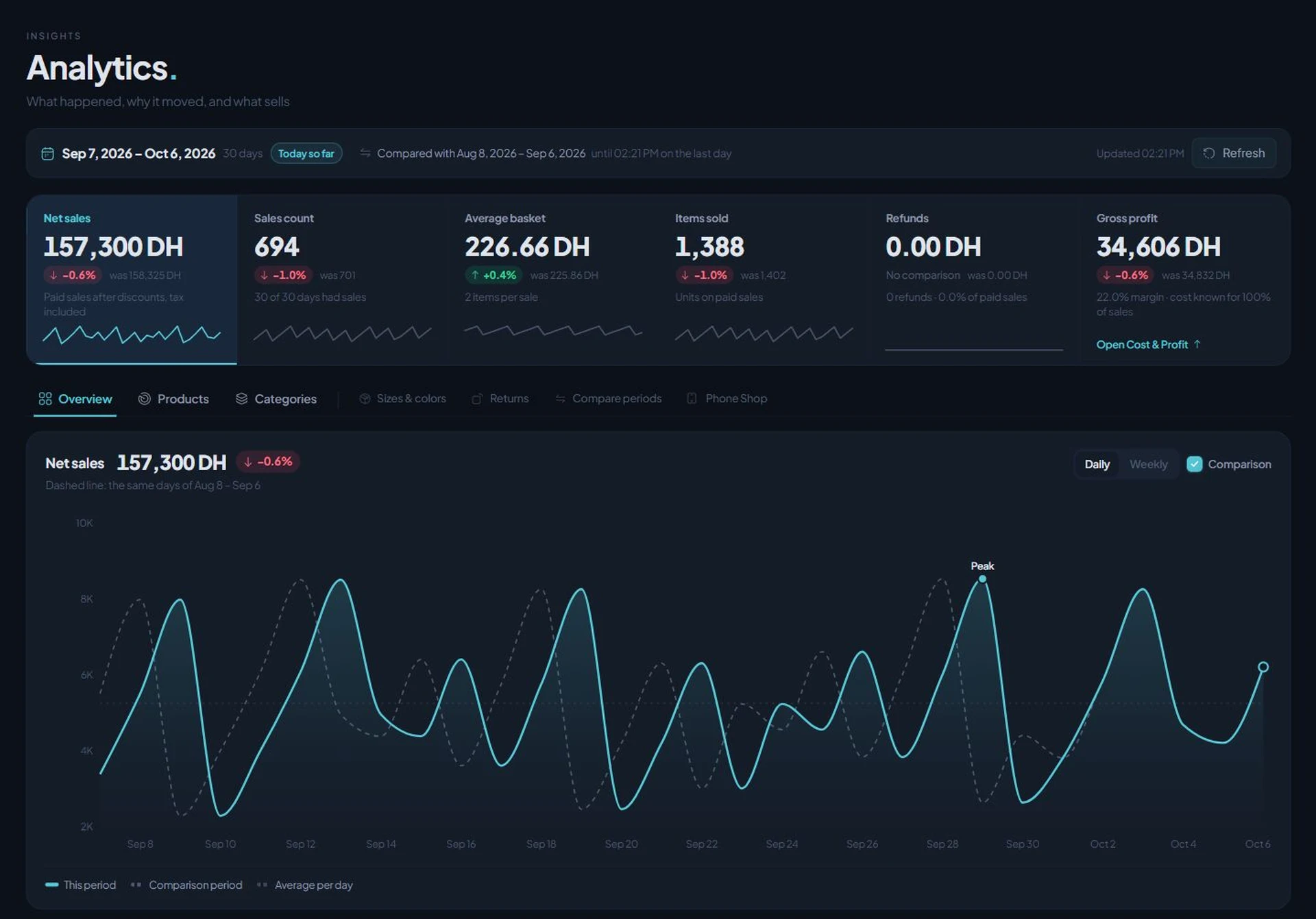
01CURRENT KASSIVO INTERFACE
04 ONE POS CORE. A CONNECTED SUITE.
The counter can be
more than one screen.
Kassivo starts with the Windows point-of-sale core, then extends the operation with purpose-built companions over your local network.
The Windows core
Engineered in Rust and Tauri as a native desktop application—not a browser tab pretending to be software.
RUST + TAURI CORE LOCAL SQLITE LAN-NATIVE
Orders land on the pass.
The kitchen screen receives tickets from the counter across the network.
LANA compatible Android phone becomes a scanner.
An Android companion streams barcodes to the counter—no dedicated gun required.
LANAdd terminals, not servers.
Tablet and rugged Android clients extend the floor without new infrastructure.
LANA mobile register with its own footing.
A standalone Android point-of-sale client brings checkout to tablets and rugged terminals with local storage and sync.
MOBILEPOS COMPANIONS CONNECT TO THE COUNTER. SPECIALIST KASSIVO PRODUCTS KEEP THEIR OWN CLEAR OPERATING BOUNDARY.
05 BUILT FOR AN ACTUAL WORKDAY
When conditions change,
the counter stays calm.
Trust is not a badge. It is how the system behaves during a rush, a lost connection, a staff change or a hardware decision.
OPERATING PRINCIPLELOCAL
The core workspace and SQLite data live around the Windows setup—not behind a browser tab.
Resilient by design
Many terminal writes can queue through a lost connection and reconcile when the link returns.
Access follows responsibility
Cashiers, managers, accountants and owners can enter through different operational boundaries.
Hardware earns its place
Windows, compatible scanners, ESC/POS printing, cash drawers, phone scanning and scales join where useful.
Shared-balance and connected services that require live state pause appropriately. We prefer an honest boundary to a fragile promise.
06 OWN THE CORE · CHOOSE THE CONNECTIONS
Your operation is not
a monthly permission.
Kassivo’s operational core is sold once. Add connected services only when they create value for the business.
One-time core license
Keep using the business workspace without monthly core rent.
Local-first daily work
Core operation remains centered on the machine running the business.
Expansion without reinvention
Profiles, terminals and optional connections can meet a more demanding operation later.
07 / PUBLIC PROOF · PRIVATE BLUEPRINT
See the capability.
Open the detail privately.
SELECTED OUTCOME
One action. More than one result.
transaction statestock contextreceipt routehistory trail
THE COMPLETE PROFILE MAP OPENS DURING A RELEVANT DEMONSTRATIONUnlock my operating view 
08 YOUR BUSINESS · NOT OUR SLIDES
The demo begins
with your bottleneck.
Bring the rush, the missing item, the delayed repair, the kitchen handoff or the paper trail. We will map that moment inside Kassivo.
Phone & Electronics. SALE — 18:42. IPHONE 13 · SCREEN REPAIR. IDENTITY: SERIAL LINKED. INVENTORY: PART −1. WARRANTY: 90 DAYS ATTACHED. CUSTOMER: HISTORY +1 REPAIR. ACCOUNTING: +490.00 POSTED
PRIVATE · RELEVANT · PRODUCT-LED
Twenty focused minutes. No feature-list theatre.
09 FREE 30-DAY TRIAL · THEN ONE SELECTED PROFILE
Try it free for 30 days.
Then own it for life.
Start with a free 30-day trial. If Kassivo fits, the $200 launch key activates one selected operating profile—not all twelve.
Try Kassivo free for 30 days—no payment and no card required. After purchase, change-of-mind refunds are not available; if an unresolvable technical fault within 14 days cannot be fixed by support, you are eligible for a full refund. Refund Policy · License and purchase terms
CURRENT LAUNCH OFFER
$200REGULAR PRICE$399
ONE-TIME PURCHASE · LIFETIME CORE
Get the $200 launch key Opens the purchase page: enter your HWID, choose a profile, then request payment instructions.- 01
- SELECTED PROFILEChoose the operating profile Kassivo will activate.
- 06
- MONTHS SUPPORTSetup and product support are included from activation.
- ∞
- LIFETIME COREThe activated core keeps working without monthly rent.
MATCHING PROFILE EXTRA · INCLUDED
PHONE & ELECTRONICSKassivo Security for Android is included with this profile.
RESTAURANT & CAFÉKassivo KDS and restaurant companion features are included with this profile.
FREE 30-DAY TRIALREAL APP · BY REQUEST
Test your chosen profile first.
Run the real Windows application in your business before activating the lifetime key. The trial needs no payment and no card.Download for Windows Request my trial key The trial key is matched to your main PC or terminal. It does not start automatically. No card is required.
Kassivo at a glance
- Product
- Local-first Windows point-of-sale software with profile-specific business workflows.
- Data and connectivity
- The Windows core uses local SQLite data. Terminals need the local network; external services need their required connection.
- License
- $200 launch price; $399 regular price. One selected operating profile, paid once.
- Trial
- A free 30-day trial is offered before purchase—no payment and no card required. Request a hardware-matched key; downloading does not start it automatically.
- Support
- Six months included. Continued support is optional. Cloud is planned and will be optional; the local license remains permanent.
- Operator
- Operated by Kassivo Team, Casablanca, Morocco. contact@kassivo.com · +212 629 693 932
10 THE QUESTIONS THAT CHANGE A DECISION
Straight answers.
No fine-print fog.
What owners and operators usually need to know before Kassivo reaches the counter.
What is Kassivo POS?
Kassivo is local-first point-of-sale software for Windows and a wider business operations suite. It connects checkout with stock, customers, staff, purchasing, reporting and profile-specific workflows, then extends through dedicated companion products.
Is Kassivo only for traditional retail?
No. Kassivo includes twelve operating profiles spanning retail, food service, grocery, fashion, pharmacy, electronics and repair, bookstores, service businesses, hardware, Moroccan B2B workflows, and a minimal starting configuration.
What happens when the internet is unavailable?
The core workspace is local-first and centered on the Windows machine. Terminal workflows include resilient queuing for many disconnected writes; shared-balance and connected services that require live state pause appropriately.
Do I need to replace my counter hardware?
Start with a Windows 10 or 11 PC. Kassivo supports practical additions such as compatible barcode scanners, ESC/POS printers, cash drawers, phone scanning and weighing workflows. We confirm the exact fit before deployment.
Does the $200 key unlock every Kassivo profile?
No. The launch key activates one operating profile you select. The matching companion is included where applicable: Kassivo Security for the Phone & Electronics profile, or Kassivo KDS and restaurant companion features for Restaurant & Café.
Will I need a monthly subscription?
No monthly subscription is required to keep using your activated local Kassivo core and selected profile. Six months of support are included; continued support is optional. Cloud services are planned, not available today, and will be optional. Choosing not to adopt cloud will not remove your permanent local license.
Is Kassivo a cloud POS or a local multi-device system?
Today, Kassivo is local-first: the Windows POS is the core, with Android terminal and scanner companions and a kitchen display connected over the local network. Companion workflows depend on the selected profile, compatible devices and access to the host. A hybrid model with optional cloud services is planned; cloud backup, remote dashboards and cloud synchronization are not being offered here as available features.
Why not publish the complete feature matrix?
Because capability only matters in context. A pharmacy, café and repair counter need different proof. A private walkthrough reveals the relevant workflow without turning this page into documentation—or exposing the complete operating blueprint.
How do I evaluate it?
Download the real Windows application, request trial access, and run scenarios from your own business. For specialist or multi-terminal setups, begin with a private workflow walkthrough.
Can I try Kassivo before buying? Are licenses refundable?
Try Kassivo free for 30 days—no payment and no card required. After purchase, change-of-mind refunds are not available; if an unresolvable technical fault within 14 days cannot be fixed by support, you are eligible for a full refund.
11 ONE OPERATING MOMENT IS ENOUGH
Tell us what
keeps going wrong.
Describe the moment your current setup keeps mishandling. You get back the profile that fits, the workflow underneath it, and the honest limit.
KASSIVO / INTAKE
Filed.
Your operating moment is with the team. The reply comes from a person, with the profile that fits it.
REFERENCE
NEXT: YOUR WORKFLOW
Do not take
our word for it.
Put Kassivo on Windows—or give us the one operating moment your current setup keeps getting wrong.
WHAT IS ACTUALLY INSIDE
More than a typical
checkout-and-stock POS.
Kassivo combines the shared POS foundation with industry records and handoffs that are usually separate products, add-ons or manual work. These are implemented product areas, not roadmap promises.
COUNTER & CONTROL
- Split payments, taxes, coupons and gift cards
- Returns, expenses, shifts and cash-drawer control
- Staff roles, approvals and an accountable activity trail
INVENTORY & PURCHASING
- Variants, barcodes, labels, imports and stock counts
- Suppliers, purchase orders, goods received and scheduled prices
- Batches, scales, recipes, waste and stock adjustments
DEVICES & REPAIR
- IMEI and serial-number lifecycle records
- Trade-ins, installments, warranties and repair jobs
- Parts recovery, loaners, appointments, theft reports and supplier RMA
RESTAURANT & BAKERY
- Tables, floors, courses, reservations and wait lists
- Kitchen display routing, modifiers and seat-level splitting
- Recipes, production context, scales and waste
PHARMACY
- Patients, prescriptions, refills and dispensing records
- Batches, expiry, DCI, mutuelles and pharmacist controls
- Controlled-substance and dosage context
MOROCCO B2B & ACCOUNTING
- Quotes, invoices, delivery notes and credit notes
- Receivables, recurring documents and payment reminders
- ICE, IF, RC, TP, CNSS, VAT, RAS and accountant/FEC exports
SPECIALIST RETAIL
- Fashion variants, promotions, gift cards, layaway and rentals
- ISBN catalog, school lists and special bookstore orders
- Weighted grocery items, labels and reordering
CONNECTED OPERATION
- Windows POS, kitchen display and Android terminals/scanner
- LAN and ESC/POS printing, scales, TPE and CCTV connections
- WooCommerce, delivery and optional connected services
12 OPERATING PROFILES IN THE CURRENT WINDOWS PRODUCT
- Phone & Electronicsidentity · intake · service · finance
- Restaurant & Caféfloor · course · kitchen · settlement
- Grocery & Supermarketweight · volume · stock · purchasing
- Clothing & Fashioncatalog · promotion · loyalty · layaway
- Bakery & Pastryrecipe · scale · waste · production
- Pharmacy & Healthbatch · patient · dispensing · control
- Hardware & Toolscatalog · credit · margin · supply
- Bookstore & StationeryISBN · school lists · orders · stock
- Service Businessintake · status · payment · history
- Morocco B2Bdocuments · receivables · compliance · export
- General Retailcheckout · inventory · loyalty · insight
- Minimal Setupessentials now · expansion later
THE KASSIVO PRODUCT FAMILY
From point of sale
to the work around it.
Kassivo is a family of local-first business applications. POS companions extend the counter; specialist products handle healthcare and phone-intake work without pretending every workflow belongs inside checkout.KASSIVO WINDOWS POS
Checkout, inventory, customers, suppliers, purchasing, staff, business records and analytics across twelve operating profiles.
KASSIVO KDS
Routes restaurant and bar orders from the Windows POS to a touch-friendly kitchen station over the local network.
KASSIVO SCANNER
Turns an Android phone into a wireless barcode scanner that discovers and streams scans to the Windows counter over LAN.
KASSIVO TERMINAL
Extends a Windows-led setup to Android tablets and rugged terminals with cashier workflows, local resilience and server-controlled access.
KASSIVO ANDROID POS
Provides an Android point-of-sale workspace for tablets and rugged devices with its own local database and synchronization boundary.
KASSIVO HEALTH
Not yet available. Kassivo Health is being developed around patients, appointments, clinicians, records, prescriptions, lab orders, billing, inventory, staff and analytics.
KASSIVO SECURITY
Runs offline-first Android risk checks with optional known-good hash lookup and transfers an accountable report to phone-register workflows by USB.
Compare offline POS systems
For an offline POS, compare what keeps working without internet, what the license includes and what your complete setup will cost. Kassivo runs its local core on Windows 10/11. The $200 launch license activates one selected business profile permanently, with six months of support and no required monthly core subscription. The regular price is $399. Kassivo has no permanent free plan. The free trial lasts 30 days; continuing afterwards requires buying and activating a license.Inventory management · Windows POS
A clearer view of your stock
Follow the product record through checkout, stock alerts and cost visibility. Use a practical checklist to test your own catalog.
POINT-OF-SALE BUYING & WORKFLOW GUIDES
Find the POS workflow that fits
Explore practical guides for the counter, industry and operating conditions you need to support.POS-SYSTEMA POS system should finish more than the payment.↗RETAIL-POSKeep the retail counter fast. Keep the record complete.↗RESTAURANT-POSThe order should reach the kitchen with its context intact.↗GROCERY-POSGrocery inventory moves before and after checkout.↗PHARMACY-POSA pharmacy sale needs more context than a basket.↗REPAIR-POSThe device has a life after the barcode.↗OFFLINE-POSYour counter should not become a loading screen.↗BUYING-GUIDEChoose a POS by the day it has to survive.↗INVENTORY-MANAGEMENTKnow your stock. Keep the counter ready.↗